
Docs · Customization
Keybindings
The shipped Hyprland keybindings, grouped by purpose. Extend them by dropping conf files into ~/.config/hypr/bindings.d/.
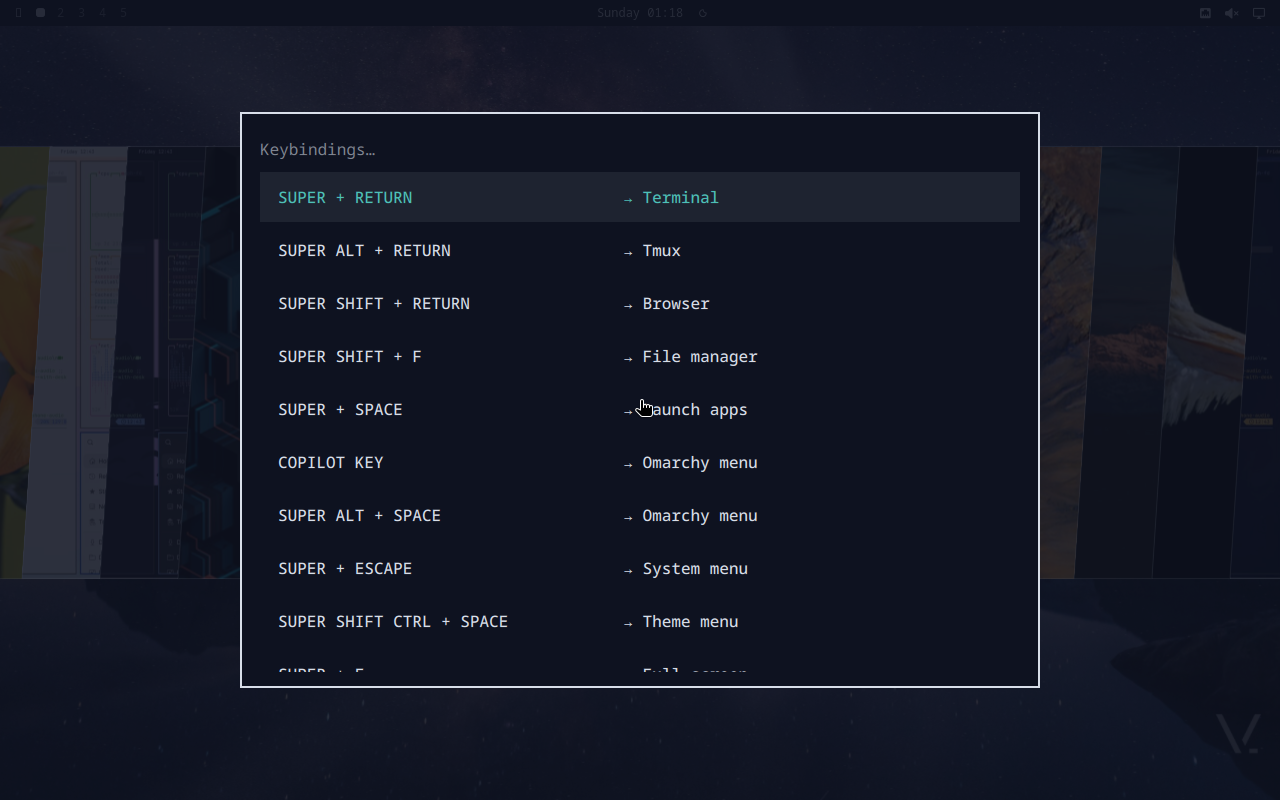
vinOS inherits Omarchy’s binding table verbatim, then layers the vinOS-specific overlays on top. If a chord below feels off, that’s because we deliberately kept Omarchy muscle memory intact.
The source of truth is ~/.config/hypr/bindings.lua (generates
hyprland.conf on config reload). What follows is the grouped view;
run Super+K at any time to search the live map
in a walker overlay.
Applications
| Chord | Action |
|---|---|
| Super+Return | Terminal (foot) |
| Super+Alt+Return | Terminal + tmux |
| Super+Shift+Return | Browser |
| Super+Shift+F | File manager |
| Super+Shift+N | Editor ($EDITOR) |
| Super+Shift+D | Docker (lazydocker) |
| Super+Shift+O | Obsidian |
| Super+Shift+M | Music (Spotify) |
| Super+Shift+G | Signal |
| Super+Shift+A | ChatGPT web app |
| Super+Shift+C | Calendar |
| Super+Shift+E | |
| Super+Shift+Y | YouTube |
| Super+Shift+X | X (Twitter) |
| Super+Shift+/ | 1Password |
Menus + launchers
| Chord | Action |
|---|---|
| Super+Space | Launch apps (walker) |
| Super+Alt+Space | Root menu |
| Super+Ctrl+O | Toggle menu (vinos-menu) |
| Super+Ctrl+H | Hardware menu |
| Super+Ctrl+C | Capture menu |
| Super+Ctrl+S | Share (or run vinos-doctor) |
| Super+Escape | System menu |
| Super+K | Show keybindings (live search) |
| Super+Ctrl+E | Emoji picker |
| Super+Shift+Ctrl+Space | Theme menu |
| Super+Ctrl+Space | Background switcher |
TUIs + quick tools
| Chord | Action |
|---|---|
| Super+Ctrl+W | Network (impala Wi-Fi TUI) |
| Super+Ctrl+B | Bluetooth (bluetui) |
| Super+Ctrl+U | Audio mixer (wiremix) |
| Super+Ctrl+A | Audio panel |
| Super+Ctrl+D | Display panel |
| Super+Ctrl+P | Power panel |
| Super+Ctrl+T | Activity (btop) |
| Super+Ctrl+L | Lock system |
Windows + workspaces
| Chord | Action |
|---|---|
| Super+W | Close window |
| Super+F | Fullscreen |
| Super+T | Toggle floating |
| Super+J | Toggle window split |
| Super+L | Toggle workspace layout |
| Super+1…9 | Switch to workspace N |
| Super+Shift+1…9 | Move window to workspace N |
| Super+Tab | Next workspace |
| Super+Shift+Tab | Previous workspace |
| Alt+Tab | Cycle windows |
| Super+← → ↑ ↓ | Focus directional |
| Super+Shift+←/→/↑/↓ | Swap window |
| Super+S | Toggle scratchpad |
| Super+BackSpace | Toggle window transparency |
| Super+Shift+BackSpace | Toggle window gaps |
Screen capture
| Chord | Action |
|---|---|
| PrintScr | Region screenshot → clipboard |
| Alt+PrintScr | Screen recording toggle |
| Super+PrintScr | Color picker |
| Super+Ctrl+PrintScr | OCR selected region → clipboard |
Toggles
| Chord | Action |
|---|---|
| Super+Ctrl+I | Toggle idle-lock |
| Super+Ctrl+N | Toggle nightlight |
| Super+Ctrl+, | Toggle notification silencing |
| Super+Shift+Space | Toggle top bar |
Extending
Drop a .conf file into ~/.config/hypr/bindings.d/; it gets sourced
by the shipped hyprland.conf. Example — add a chord for
vinos-focus 45:
# ~/.config/hypr/bindings.d/personal.conf
bind = SUPER SHIFT, F, exec, vinos-focus 45 --task "deep work"
bind = SUPER SHIFT, R, exec, vinos-brief
bind = SUPER SHIFT, T, exec, foot -e vinos-standup --week
Reload without restarting:
$ hyprctl reload